Which organizations DocOps serves
Agentra DocOps is AI software for the administrative documents of universities, agencies, companies and organizations that format documents under Decree 30/2020/NĐ-CP on clerical work.
Under Article 2 of the Decree, state agencies and organizations and state-owned enterprises apply it directly; political organizations, socio-political organizations, social organizations and socio-professional organizations apply it as appropriate, based on the Decree together with the regulations of the Communist Party and of the law. Non-state companies are not bound by it, but can adopt this format as the standard for internal documents.
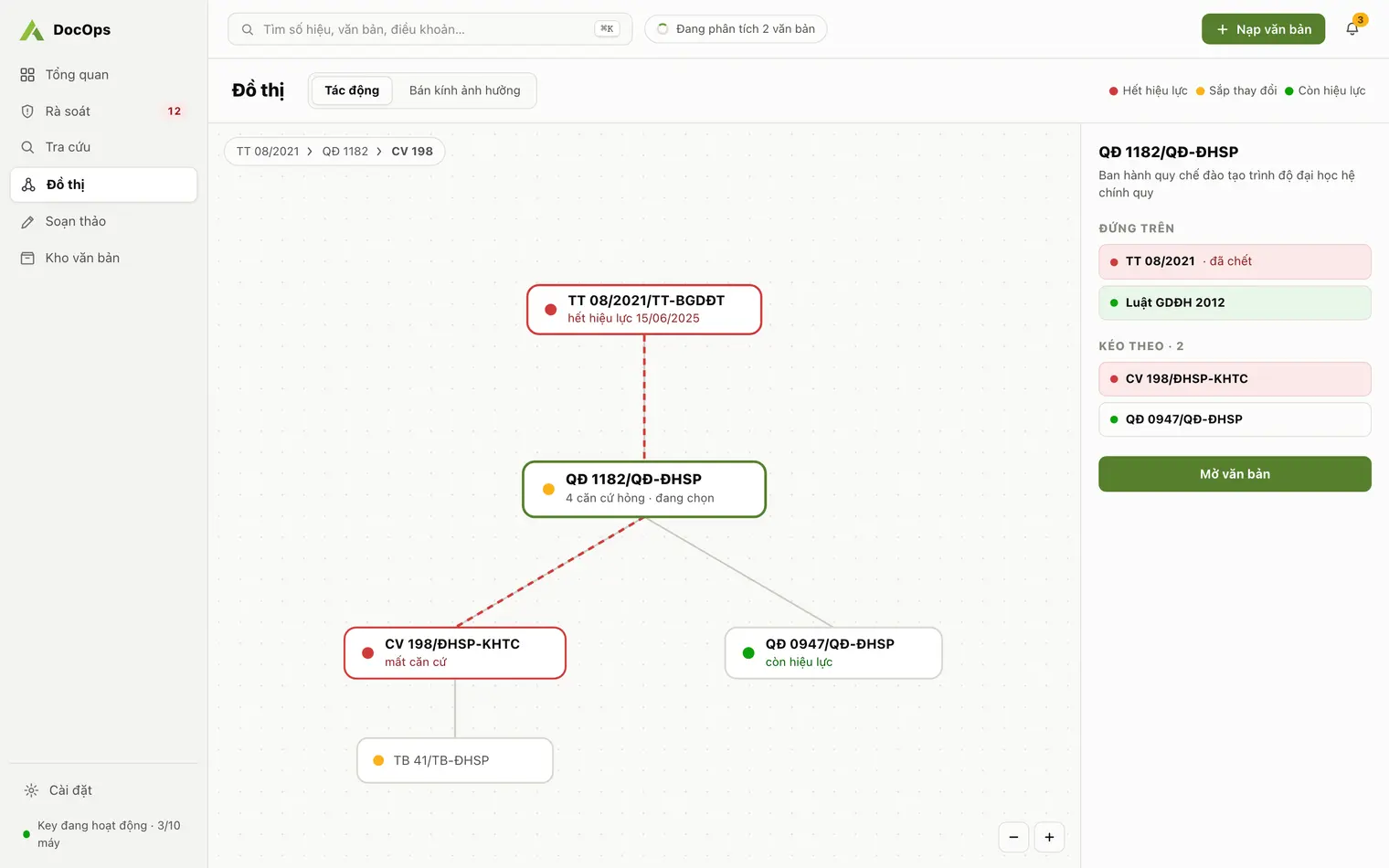
Laws, decrees and circulars are not administrative documents, but DocOps tracks them as legal bases: which document cites which, and which has been replaced, repealed or not yet taken effect.
Everyday clerical work: by hand and with DocOps
| Task | By hand | With DocOps |
|---|---|---|
| Find the internal rule on a matter | Open folder after folder, reread each document | Ask in plain words; the answer cites the number and Article, click to open the source document |
| Know which documents rest on a replaced circular | Remember or check by hand | Warnings across the whole repository: replaced, repealed, not yet in force |
| Draft a notice, decision or submission | Open an old document as a template, edit it line by line | Write one sentence of intent, get a draft in the right format, export to Word or PDF |
| Check the format of an incoming document | Check by eye | Check 9 format items, each marked passed, missing or needs review |
| Keep document knowledge when staff move on | Lives in the departed person’s head | A repository with numbers, validity and legal relations, building up year by year |
What DocOps does for your organization
- Ingest: PDF, scans included: pages are recognised one at a time, with the number, signing date, issuing body and subject extracted; staff confirm each document into the repository.
- Classify: files each document under one of the 29 types of administrative document in Decree 30; the full list is on Administrative document types.
- Search: full-text search without typing accents, plain-language questions and answers that cite the number and Article, see AI document search.
- Legal basis review: warns about documents resting on bases that are replaced, repealed or not yet in force, see Legal basis review.
- Drafting: decisions, notices, submissions, plans, reports… from one sentence of intent, see Decree 30 document drafting.
- Universities: get a dedicated section for academic affairs and academic regulations, see AI for university administration.
For commune people’s committees and civil servants
At a commune or ward people’s committee, one civil servant often drafts documents and also has to know the decisions and plans issued from above. DocOps is an AI assistant for both jobs, on the commune’s own repository.
- Drafting: official letters, proposals, reports, plans, notices and minutes under Decree 30 from a one-sentence brief; committee name, place and signer filled in for you, see Decree 30 document drafting.
- Documents from above: ingest decisions, plans and guidance from the province and departments, then ask in plain words; answers cite document number and article, see AI document search.
- Legal basis review: see which commune documents rest on bases that were replaced or repealed, see Legal basis review.
- Own repository: one key and one separate repository per commune, on your machine.
Runs alongside your document management system
DocOps does not handle the incoming/outgoing document flow, submission for signature or digital signing. Your e-Office or document management software keeps that role unchanged.
DocOps works on document content: building a knowledge repository, cited search, legal basis review and drafting. Drafts export to Word or PDF to enter your existing issuance process.
Where your organization’s data lives
- The repository lives on the machine (a SQLite database); each organization has its own key and its own repository; backup and restore happen on the machine.
- AI steps (recognising scanned pages, classification, question answering, drafting) send content through the DocOps server to an AI model, by default Anthropic’s Claude. The server does not store the content.
- Details on how DocOps uses AI and protects data are on AI and data transparency.
What DocOps does not do yet
- It ingests PDF files only; Word files are usable in drafting (importing .docx into a draft).
- Communist Party documents and those of organizations with their own format guidance (no National Title or Motto) are not supported: the drafting template always includes the National Title and Motto, and the format check scores against Decree 30.
- It does not manage accounting vouchers such as invoices, receipts or payment vouchers.
- The app interface is in Vietnamese.
Getting started with DocOps
- Download and install DocOps for Windows or macOS on Download.
- Request a key for your organization in the app, or through Contact.
- Fill in the organization details (parent body, issuing body, place name, signer) so drafts fill in the format parts automatically.
- Ingest the documents you rely on as bases and your internal documents, then confirm each one into the repository.