Documents are processed by AI flows. Staff make the final decision.
DocOps does the heavy work: reading, extraction, classification, search and drafting. Your staff, the real domain experts, always have the last word on what gets used.
- 01
Ingest
Ingest PDFs, scans included: page-by-page OCR, extraction of number, signing date, issuing body and summary with confidence scores.
- 02
Classify
Classify into the 29 Decree 30 document types, extract legal relations and business rows, check 9 format parts.
- 03
Search
Answers come with specific citations; guessing is blocked when the basis is missing.
- 04
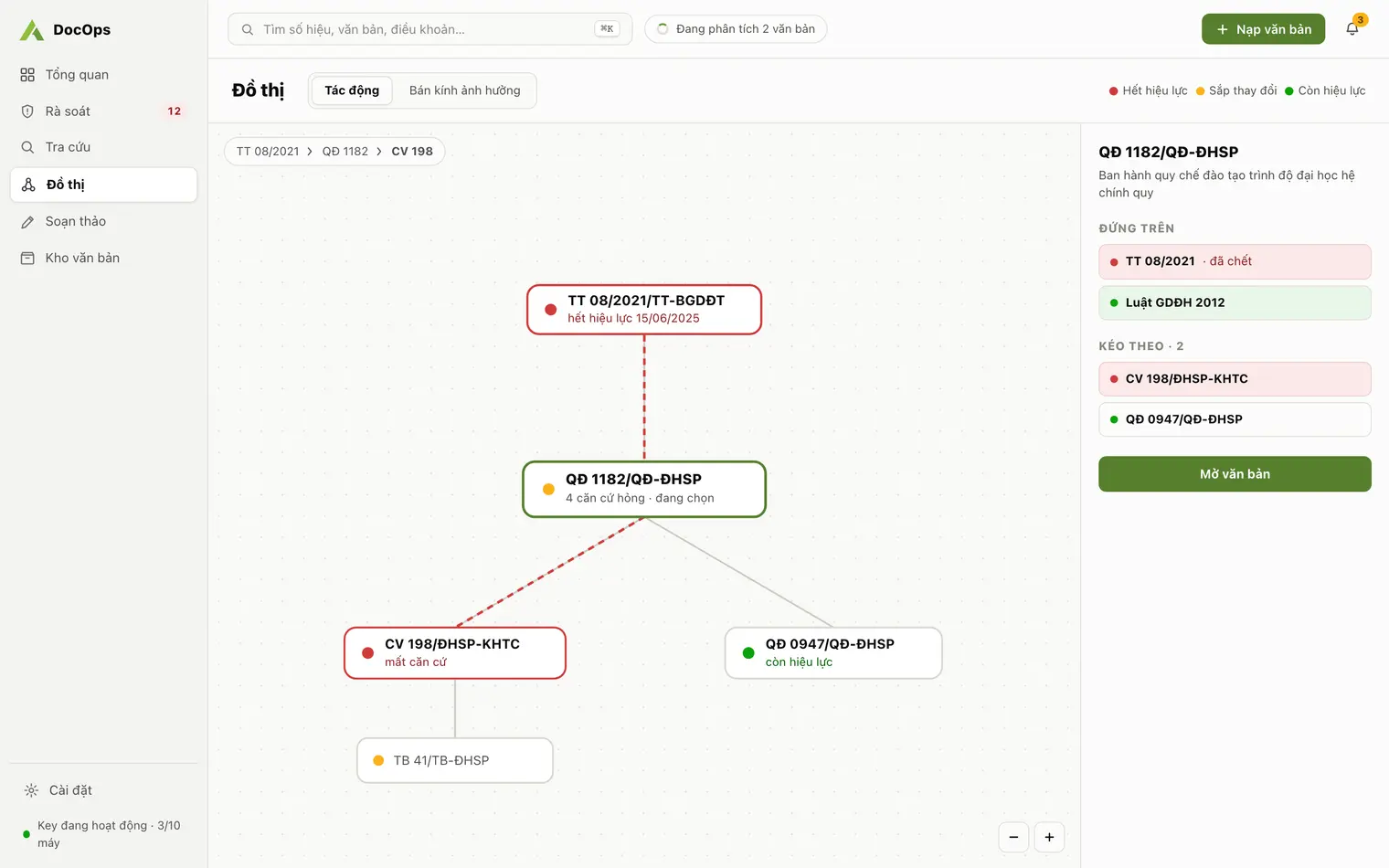
Impact
Trace the legal relationship graph: which document cites which, and which references have expired or are about to change.
- 05
Draft
Draft in the Decree 30 format, flag expired references with a one-click replacement, export to Word or PDF.
- 06
Staff review & approve
Staff confirm documents into the repository, approve legal relations and edit drafts before signing. AI assists; it never replaces the decision.
One knowledge base, three everyday jobs
Trustworthy because it is checkable
Citations required
Every answer names its source: document number and article; one click opens the original.
Staff confirm the data
New documents and low-confidence relations wait for staff; every decision goes into an append-only audit trail.
Data per institution
Each institution has its own key and workspace; original documents stay on your machine.
Why a person is in the loop
Administrative documents have legal consequences. AI assists but does not replace professional judgement.
What DocOps solves for universities, agencies and companies
Features
Legal basis review
Find documents that rest on replaced, repealed or not-yet-effective bases, and see what changing one article pulls along.
Learn moreDecree 30 document drafting
From a one-sentence brief to a correctly formatted draft for 29 document types, expired bases flagged, Word and PDF export.
Learn moreAI document search
Ask in plain language across your organization’s documents; answers cite document number and article. Full-text search without diacritics.
Learn moreBy organization
AI for university administration
Turn a folder of PDFs into a structured repository so clerical, academic affairs, legal and leadership staff find what they need.
Learn moreDocument AI for communes, agencies, firms
For people’s committees, departments, companies, mass organizations and associations: your own repository, cited search, legal basis review, Decree 30 drafting.
Learn moreRecords management guides
Administrative document types
All 29 administrative document types in Decree 30, their official abbreviations, how to write the reference code and the pairs people mix up.
Learn moreAdministrative document format
The nine main format parts, margins, font and sizes from Appendix I of Decree 30, and a checklist to run before a document goes for signature.
Learn moreDocOps vs ChatGPT
An honest comparison for administrative documents: answer sources, citations, validity of legal bases, format and data.
Learn moreReady to try DocOps at your institution?
Download the app, request a key right from the activation screen, and start reviewing your document repository today.