What is legal basis review?
Legal basis review is checking the "Pursuant to …" lines of a document against the current validity of the documents they cite, to catch bases that were replaced, repealed or are not yet in force.
At a university, one circular of the Ministry of Education and Training can be the basis for dozens of internal documents: training regulations, academic rules, decisions setting up councils. When that circular is replaced, the internal documents do not change by themselves. Tracing them by hand means remembering which document cites which, and it usually happens only after something goes wrong.
DocOps stores every relationship between the documents in the repository as a graph, so "which documents still rest on the old basis?" becomes a query on data instead of a search through memory.
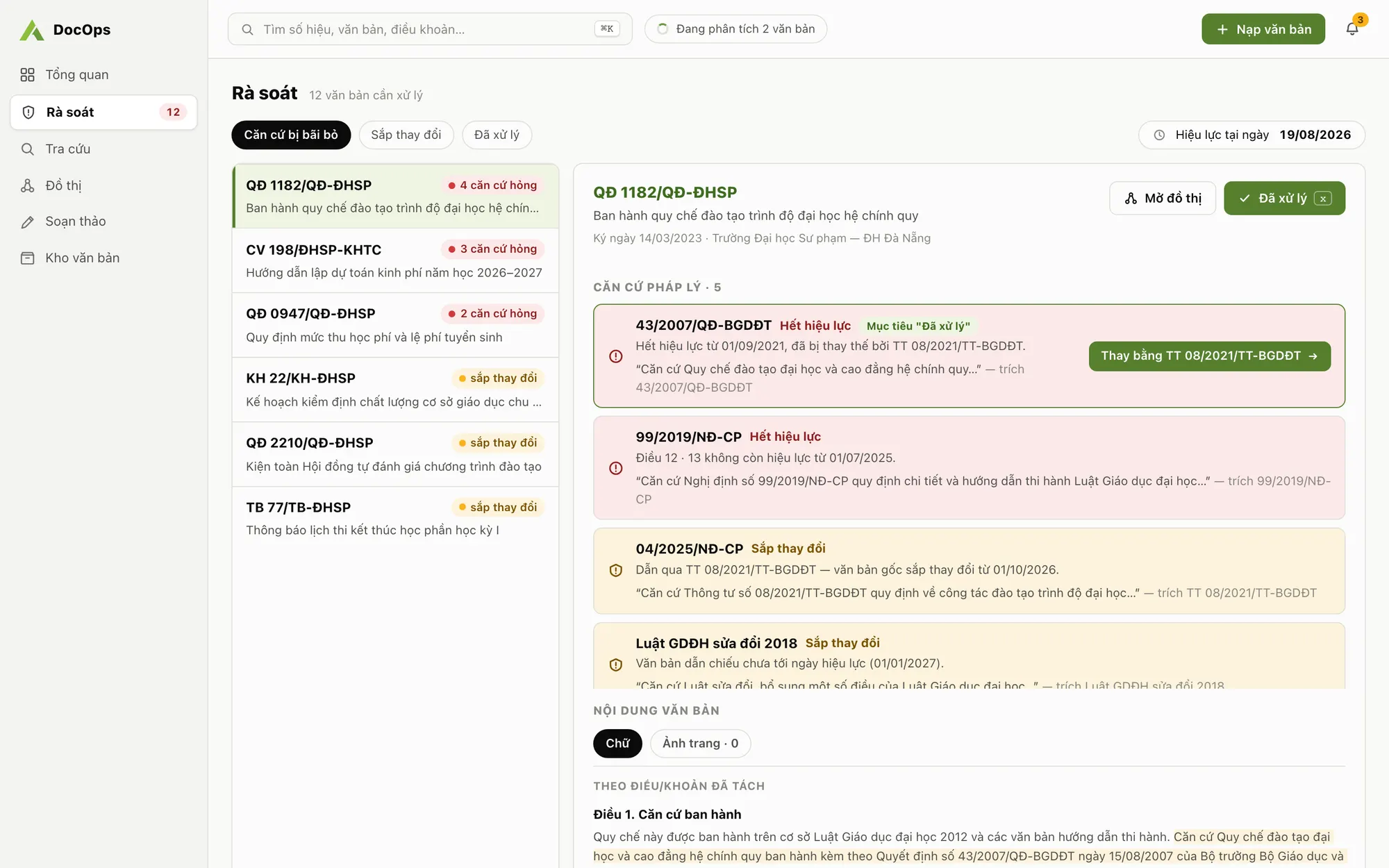
Manual review vs. review with DocOps
| Task | By hand | With DocOps |
|---|---|---|
| Spot replaced or repealed bases | Re-read every document, look up every basis | Automatic warnings across the repository on the Review screen |
| Indirect bases | Usually missed | "About to change" warning when a basis of a basis is replaced or repealed (2 levels) |
| Validity on a given date | Work it out from issue and effective dates | Pick a date in "Valid as of"; warnings are recalculated |
| Impact before amending | Estimated from experience | Impact radius: counts the business rows that rely on each article |
| Evidence | Loose notes | Every relation keeps the sentence that created it |
What DocOps warns about
The Review screen collects warnings for the whole repository, filtered into three groups: repealed basis, about to change, and handled.
- Replaced or repealed basis: your document cites a document that another document in the repository replaces or repeals.
- About to change: the direct basis is still valid, but its own basis was replaced or repealed. DocOps follows two levels like this.
- Not yet in force: your document cites a document whose effective date has not arrived on the date you are viewing.
The legal relationship graph
When a document is ingested, DocOps reads its cross-references and records five relation types: basis, guidance, amendment, replacement and repeal. Each relation keeps the original sentence that produced it so staff can check it. Relations with a confidence of 0.85 or more go straight in; lower ones wait for staff approval.
On the Graph screen, Impact mode shows, for the selected document, what it rests on and what depends on it. Note that amendments are drawn on the graph but do not raise warnings, because an amended document is still in force.
Impact radius: what to re-check when you change an article
Review answers the question after the law has changed. Impact radius answers it before: how many key figures (years, ratios, fees, credits), hard gates and thresholds in the repository rest on a given article.
DocOps counts the business rows that cite each article and draws each article as a bubble; the bigger the bubble, the more places to re-check. The count runs on your machine, is deterministic, calls no AI and uses no tokens. On the sample repository that ships with the product (104 documents, 206 articles, 280 relations), the heaviest article is cited by 12 business rows.
What uses AI and what runs locally
- Uses AI: reading documents and extracting cross-references and three business layers (key figures, hard gates, thresholds) from their content.
- Runs locally, no AI: validity warnings, date recalculation, impact spread and impact radius. The same repository always gives the same result.
- Plain-language questions about a specific document are answered by AI document search.
- When you write a new document, expired bases are flagged right in the draft: Decree 30 document drafting.
Start reviewing your institution repository
- Download DocOps for Windows or macOS and activate it with your institution key.
- Ingest the PDFs you rely on as bases: circulars and decisions of higher authorities plus your internal documents.
- Confirm each document into the repository and approve low-confidence relations.
- Open Review, set "Valid as of" and work through the warnings; mark each one handled when done.